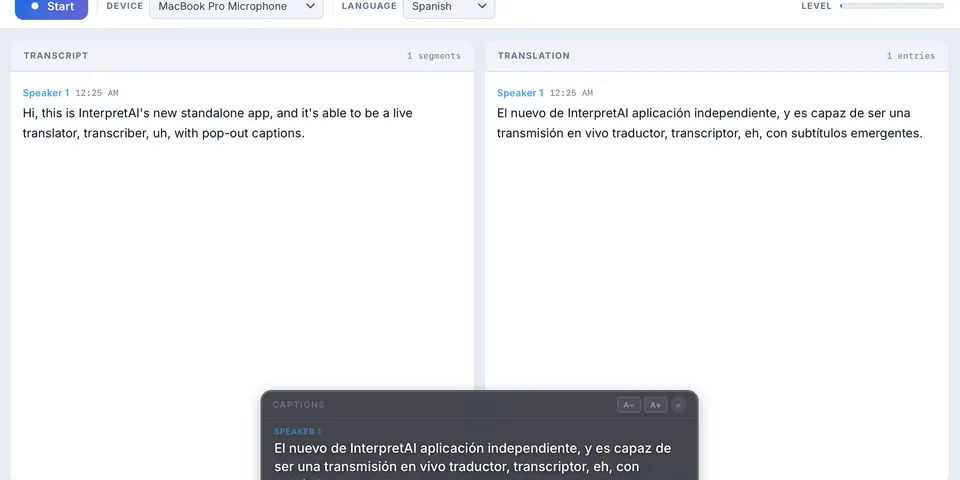
We’re excited to launch the Interpret AI Desktop App — a standalone application for Mac and Windows that brings real-time transcription and translation to your entire computer, not just your browser.
What It Does
The desktop app captures audio from any source on your computer and transcribes it in real time. That means:
- Video calls on any platform — transcribe audio from Google Meet, Microsoft Teams, Webex, or any other conferencing tool
- Webinars and online courses — get live captions and translations from any streaming content
- Local media — transcribe audio from video files, podcasts, or recordings playing on your computer
- In-person conversations — use your computer’s microphone to transcribe meetings happening in the room
Key Features
Real-Time Speaker Differentiation
The app automatically identifies different speakers in the conversation and labels them in the transcript. No manual tagging needed — you can see exactly who said what.
Live Translation
Just like the web app, the desktop version supports live translation into 70+ languages. Select your target language and see translations appear in real time alongside the original transcript.
Broadcast to an Audience
Start a broadcast session from the desktop app and share the link. Your audience can follow along on their phones in their preferred language — perfect for presentations, lectures, and live events.
Synced Transcript Editor
Every session is saved and accessible from your Documents. Open any transcript in the editor to:
- Play back the audio synced to the transcript
- Click any word to jump to that exact timestamp in the recording
- Edit and correct the transcript with word-level precision
- Translate the full transcript into additional languages after the session
How to Get It
Download the desktop app from interpretapp.ai/download. It’s available for both Mac and Windows.
Your existing Interpret AI account works across the web app, mobile app, and desktop app — same login, same credits, same saved transcripts.
Why a Desktop App?
The web app works great in Chrome and other browsers, but browsers can only capture audio from the browser itself. The desktop app removes that limitation. It sits in your system tray and can capture audio from any application running on your computer.
This is especially useful for:
- People who use conferencing tools that don’t have built-in transcription
- Students taking online courses on platforms without captions
- Anyone who needs to transcribe audio from desktop applications